
The workflow can be understood as a constrained image-to-video pipeline. Flying Roadster AI Video Generator accepts a small set of vehicle references and an optional human portrait, lets the user select output parameters, then applies a defined flight sequence to produce a shareable clip. The interface keeps the inputs explicit: accepted image formats, file size, suggested angles, output dimensions, and aspect ratios are all visible before generation. This is different from an open prompt canvas where a creator must design motion from scratch. The fixed concept makes the result predictable enough to approach quickly while leaving the user’s own images as the main source of variation.
Flying Roadster AI Video Generator turns still images into a personalized cinematic flying car scene. A creator begins with one to three photographs of the same car, then may add one clear driver portrait to place a person in the scene. The built-in flight sequence supplies the motion and visual premise, so there is no need to record a real driving clip or edit a timeline by hand. The goal is a playful escape from everyday traffic: take a familiar vehicle, give it a starring role, and create an AI video ready to download and share. The experience centers the user’s own car and choices.
The setup offers two ways to cast a vehicle. Visitors can choose from ready-to-use luxury car examples, including a crimson spider, golden supercar, pearl white GT, or midnight luxury coupe, or replace the selection with their own reference photos. Flying Roadster AI Video Generator accepts JPG, PNG, and WebP car images, with each file limited to 10 MB. One to three photographs can help show the vehicle from different angles; a side and front view are suggested. Keeping the same car in all references helps maintain a coherent subject through the generated scene.
A portrait is optional, which keeps the workflow useful for both a car-only flight and a more personal scene. When a creator chooses to include a driver image, Flying Roadster AI Video Generator asks them to confirm that they have permission to use every submitted photo and likeness, and that any person shown is an adult. A clear portrait is recommended. This step puts consent and age expectations in front of the generation action instead of treating personal images as an afterthought. The creator remains responsible for selecting appropriate source photos and deciding how to share the resulting video.
Before generation, the creator can choose output resolution and framing. Flying Roadster AI Video Generator offers 480p standard and 720p high definition, alongside six aspect ratios: vertical 9:16, widescreen 16:9, square 1:1, 4:3, 3:4, and panoramic 21:9. These choices help adapt a scene for a short-form social post, a regular video player, a square feed, or a wide display. Both resolutions use the same credit amount according to the pricing section. Selecting the frame before takeoff helps the finished clip fit its intended destination without requiring a separate crop as the first editing step.
The generated sequence is designed around the flying roadster idea rather than a blank video editor. Flying Roadster AI Video Generator combines the chosen car reference, optional portrait, and built-in flight sequence into one coherent scene. This makes the main action simple: choose a subject, pick a format, and request a video. It is useful for someone who has an image but not the footage, equipment, or editing time to create the concept manually. The product aims to make a familiar car look like the lead character in a cinematic escape above the road and city skyline.
For people evaluating AI products, the operational details are also clear. Flying Roadster AI Video Generator charges 50 credits per video, offers one-time packs, and reports automatic refunds for failed generations. Videos and source files stay private and are retained for seven days, which gives a creator time to review and download but not indefinite storage. Background generation allows the user to leave and return to Recent generations. Those constraints define the service as an on-demand creative tool, not a permanent asset repository. The homepage provides enough information to judge input handling, output flexibility, price, and retention before using it.
Generation runs in the background, so a creator can leave the page while the video is being made and return to Recent generations or the flight log afterward. Flying Roadster AI Video Generator keeps uploaded files and finished videos private and available for seven days, giving the user a window to review and download a favorite. That retention period is explicit, so people should save a clip they want to keep before it expires. The flow is oriented around creating an individual result, checking it, and downloading it, rather than maintaining a permanent public gallery of everyone’s generations.
The pricing model uses credits for individual flights rather than a recurring subscription. One video generation costs 50 credits; packs offer 50 credits for $8, 100 for $16, or 200 for $32 as one-time purchases. Flying Roadster AI Video Generator states that purchased credits do not expire and that failed generations return their credits automatically. That structure gives a new user a small starting pack and lets returning creators choose a larger bundle. It also makes the cost per generation visible before purchase, so people can consider the intended use and output format before they spend credits.
The concept connects to the social-media flying car trend while inviting a personal variation. A Tesla Roadster can be part of the idea, but the site also supports other cars, so the result does not depend on using one exact vehicle. Flying Roadster AI Video Generator can make a playful meme, a celebratory clip, a fictional campaign visual, or a personalized post built around a favorite car. Vertical framing suits short-form channels, while widescreen can emphasize a cinematic scene. The user supplies the subject matter; the generated flight gives it a visual twist that can be shared or simply kept as a fun experiment.
The product’s homepage positions the experience for quick creative play: upload photos, choose a resolution and frame, then generate. Flying Roadster AI Video Generator is not a general-purpose editing suite with a large timeline, layers, or a library of production controls. Its narrower workflow may appeal to people who want a specific result without managing a complex video project. The site provides ready-to-use example photos for a first try, which can help visitors understand the idea before preparing their own images. That starting point keeps the experience approachable while still allowing the creator’s own car and portrait to personalize the result.
The site describes the service as independent fan-made AI entertainment and says it is not affiliated with Tesla, Inc. Flying Roadster AI Video Generator should therefore be understood as a creative tribute to the flying-roadster idea, not an official Tesla product or announcement. This distinction matters because the visual theme references a real automotive brand while the generation itself is an entertainment feature. Users can make their own fictional scene without treating the output as a real vehicle demonstration or product claim. Clear expectations help keep a playful video in context when it is downloaded, posted, or shared with others.
Flying Roadster AI Video Generator uses car references and optional portraits to make a defined flight sequence, with selectable resolution, framing, credits.

Project Moon Life is a browser simulation where a resident’s health, sanity, resources, and relationships shift as each decision changes the next year.
Premium undetected game modifications, HWID spoofers, and free gaming tools designed for seamless performance, maximum stability, and account safety.
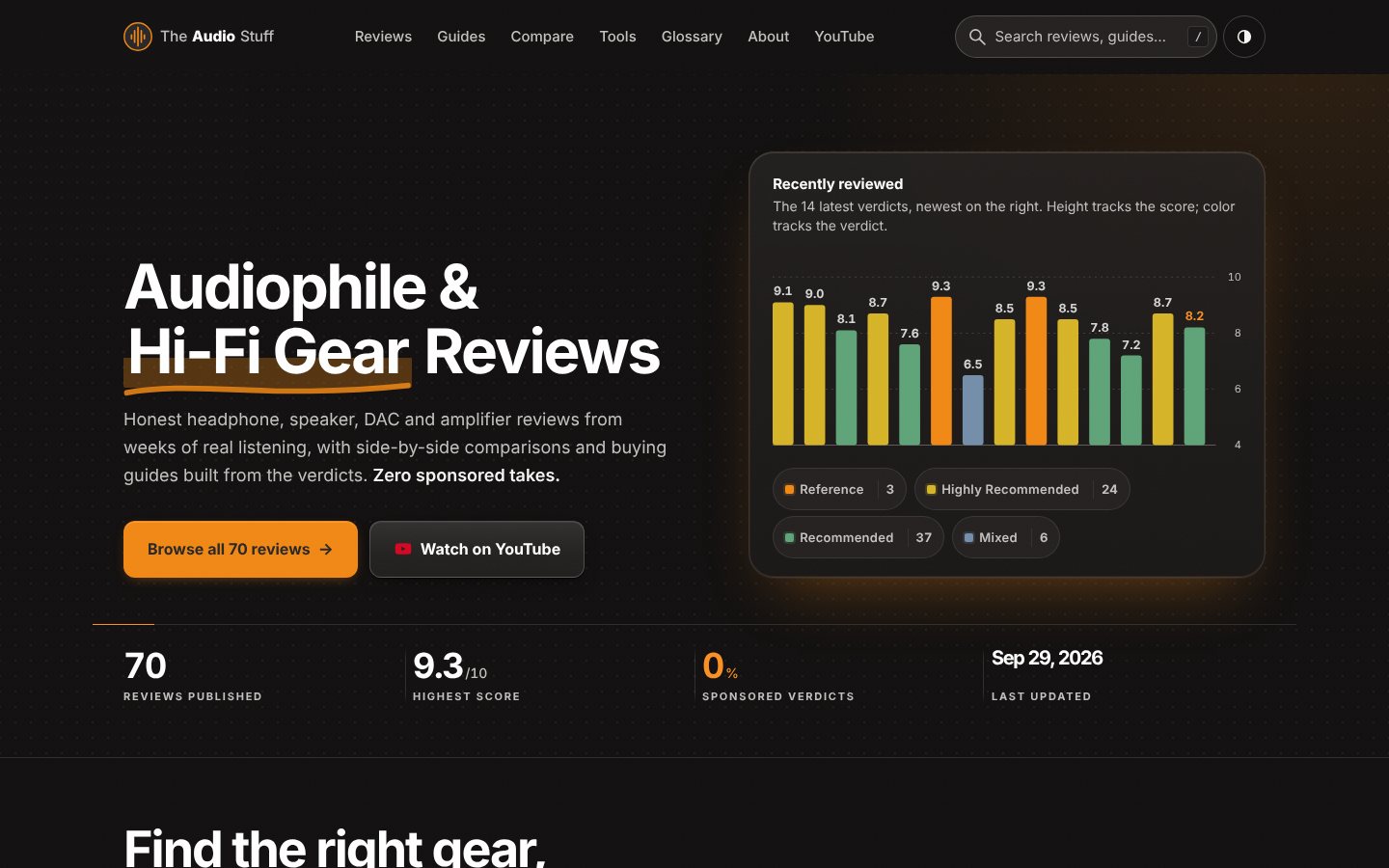
Find the right hi-fi gear for your ears, room and budget: ad-free reviews from weeks of listening, 12 buying guides, 35 comparisons and 17 free audio tools.

Get Face Report is an AI-powered facial analysis and personal styling platform that helps users understand their facial features

Antique Scanner reads hallmarks, maker's marks and wear in your photos — and returns an honest identification with age and value ranges.
